
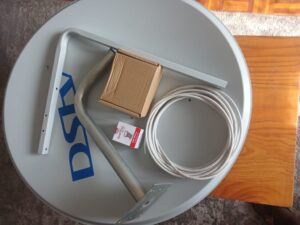
Yes, you can transfer your DStv when moving house in South Africa without losing signal by relocating your decoder, dish, cables, and reconnecting everything correctly or using a professional installer to set up and align your system at the new property. If you are changing homes and want uninterrupted viewing, this complete guide explains the smartest way to move your DStv, avoid signal problems, and reconnect quickly in 2026.
Many South Africans move homes each year and assume they must buy a new decoder or start over. The good news is that your current DStv equipment can usually be moved and reinstalled at your new address with minimal downtime.
Why Proper DStv Relocation Matters
Moving your DStv incorrectly can lead to:
- No signal errors
- Damaged cables
- Dish misalignment
- Missing channels
- Decoder connection issues
- Poor picture quality
- Unnecessary repair costs
Planning your move properly saves time and money.
The Smartest Way to Transfer Your DStv When Moving House
The best method is to move your system carefully and reinstall it professionally.
What to Move
Take the following items with you:
- Decoder
- Remote control
- Power supply
- HDMI cables
- Smartcard (if applicable)
- Dish and bracket
- LNB
- Existing cables if reusable
Before Leaving Your Old House
Do these checks first:
- Disconnect decoder safely
- Label cables if needed
- Remove dish carefully
- Protect decoder during transport
- Keep accessories together
Is the DStv Decoder Transferable?
Yes, the DStv decoder is transferable to your new house. Your decoder is linked to your account, not permanently fixed to one property.
What This Means
You can move your decoder to:
- A new rental home
- Purchased property
- Apartment
- Townhouse
- Temporary residence
Important Note
Your decoder still needs:
- Correct dish signal
- Proper cable connection
- Power supply
- Account in good standing
- Package active
If these are in place, the decoder should work at the new address.
How to Reconnect DStv After Moving?
To reconnect DStv after moving, install the dish correctly, connect the decoder, power on the unit, and restore signal alignment.
Step-by-Step Reconnection Guide
- Mount the dish securely
- Align dish toward correct satellite direction
- Connect coaxial cable to LNB and decoder
- Connect HDMI cable to TV
- Plug in power
- Turn on decoder
- Check signal strength
- Refresh channels if required
If Channels Do Not Return
Try:
- Restart decoder
- Confirm subscription is active
- Check cable fittings
- Request signal reset
- Contact a technician
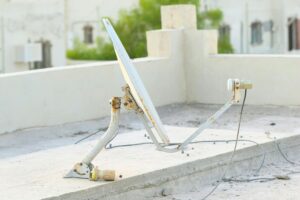
What to Do if DStv Loses Signal?
If DStv loses signal after moving, the most common cause is poor dish alignment or cable issues.
Fast Fix Checklist
- Check dish moved in wind
- Confirm cable is tight
- Inspect damaged wires
- Reboot decoder
- Check LNB condition
- Verify no tree or wall blockage
Error Messages You May See
- No signal
- E48-32
- Searching for signal
- Weak signal detected
Best Solution
If signal remains poor, professional realignment is usually the fastest fix.
Should You Move the Dish or Install a New One?
That depends on the age and condition of your equipment.
Move Existing Dish If:
- Dish is in good condition
- LNB still works
- Bracket is rust-free
- Cables are usable
Install New Dish If:
- Existing dish is damaged
- Rusted bracket
- Cracked LNB
- Old cables causing faults
- Better long-term reliability needed
DStv Moving House Cost Guide South Africa
Prices vary depending on area, complexity, and whether a new dish is needed.
Service Type | Estimated Cost Range |
Decoder relocation only | Low |
Dish removal and reinstall | Medium |
Full relocation with new cable | Medium |
New dish + full installation | Higher |
Signal repair after move | Medium |
Professional service often saves money by avoiding repeat issues.
Best Time to Move Your DStv
To reduce downtime, move your DStv:
- 1 day before move-in
- Same day as furniture delivery
- Before major sports weekends
- Before school holidays
- During daylight hours for easier setup
Common Mistakes People Make When Moving DStv
Avoid these expensive errors:
Throwing cables loosely into boxes
This can damage connectors.
Forgetting the power supply
Many people move decoder but forget the adapter.
Mounting dish incorrectly
Even slight movement affects signal.
Reusing damaged cable
Old cable can weaken signal badly.
Trying random dish directions
Satellite alignment needs accuracy.
Can I Use My DStv at Another House Temporarily?
Yes, many people move a decoder temporarily to another location, provided:
- There is a compatible dish setup
- Correct signal available
- Subscription active
- Decoder connected properly
This is common during holidays or short stays.
Why Use a Professional DStv Installer After Moving?
A technician can save hours of frustration.
Services Include:
- Safe dish removal
- Reinstallation
- Signal alignment
- Cable replacement
- Decoder testing
- Extra View setup
- Error correction
Many no-signal problems after moving are solved in minutes by a pro.
How Long Does DStv Relocation Take?
Typical timeframes:
Job Type | Time Estimate |
Decoder reconnect only | 15–30 mins |
Dish reinstall | 45–90 mins |
Full new setup | 1–2 hours |
Troubleshooting signal loss | 30–60 mins |
Frequently Asked Questions
1. Can I move my DStv to a new house?
Yes, you can usually move your DStv to a new house without needing to buy a completely new system. In most cases, your decoder, satellite dish, remote control, cables, and accessories can be removed from the old property and reinstalled at the new address. This is one of the most cost-effective options for people relocating in South Africa. Before moving, it is a good idea to disconnect the equipment carefully and keep all accessories together to avoid losing parts. Once you arrive at the new property, the system can be reconnected and aligned again so you can continue watching your favourite channels.
2. Is the DStv decoder transferable?
Yes, the DStv decoder is transferable and can be used at another property as long as it is connected properly to a working satellite dish and active account. Your decoder is linked to your subscription account rather than permanently tied to one house. This means if you move to a townhouse, apartment, rental property, or new family home, you can normally take the decoder with you. The important part is ensuring the dish at the new location is correctly aligned and the decoder is connected using the right cables. If everything is installed properly, the decoder should work as normal.
3. How do I reconnect DStv after moving?
To reconnect DStv after moving, start by placing the decoder near your television and plugging in the power supply. Connect the HDMI cable from the decoder to the TV, then connect the satellite cable from the dish to the decoder. Once everything is connected, switch on the decoder and television. If the dish has been mounted correctly and aligned to the satellite, channels should load normally. If they do not appear immediately, restart the decoder and request a signal refresh. Many reconnection problems are solved by checking cable connections and ensuring the dish is properly pointed.
4. What causes no signal after moving?
The most common reason for no signal after moving house is incorrect dish alignment. Even a small change in dish position can prevent the decoder from receiving a proper satellite signal. Other common causes include damaged cables during transport, loose connectors, faulty LNB units, or obstacles such as trees and walls blocking the signal path. Sometimes the decoder itself may simply need to restart after being disconnected. If you see a no signal message after moving, first inspect all connections, then check the dish position. If the problem continues, professional realignment is usually the fastest solution.
5. Do I need a new dish when I move?
Not always. If your current dish is still in good working condition, it can often be removed and installed at the new property. Many people successfully reuse their existing dish and save money. However, if the dish is rusted, bent, cracked, or has an old faulty LNB, replacing it may be the better long-term option. Old cables can also weaken signal quality, so these may need replacement even if the dish itself is fine. A technician can inspect the system and advise whether reusing or replacing the dish is the smarter choice.
6. Should I hire a technician?
Yes, hiring a technician is often the best choice if you want a fast, stress-free DStv relocation with reliable signal quality. A professional installer knows how to safely remove the dish, remount it securely, align it accurately, and test the decoder once connected. This can save hours of frustration and prevent repeated no-signal issues. Technicians can also replace damaged cables, fix weak signal problems, and help with Extra View or Explora setups. While some people attempt DIY installation, professional service usually provides better results and fewer problems after moving.
Conclusion
If you are moving house and want the smart way to transfer your DStv without losing signal, the best solution is to move your decoder and dish carefully, reconnect everything properly, and ensure the dish is accurately aligned at the new property. Your decoder is transferable, your account remains active, and most setups can be restored quickly. If you experience signal loss after moving, the issue is usually alignment or cable related. Using a professional installer can help you get back to watching your favourite channels fast, with less stress and fewer technical problems.